Posts

What is spyware

Image
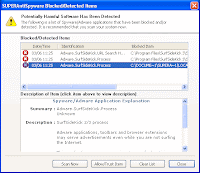
It is one of the big program in the computer. Spyware collect a lot of different type of information about a user. Spyware is a type of program that watches what users do with their computer and sends that information over the internet. More malicious version can try to record what a user types to try to intercept password and credit card numbers. Other versions simply pop up advertisements. It is not a illegal software, No one can prove it as a illegal software. Spyware is one kinds of Advertising supported software. It is a way to sharewares to make money from a product. Other than by selling it to the users. In this way you do not have to pay for your software and the developers are still getting paid. It is one kinds of great software who use this software his/her computer must be in safe position. It can safe your computer with block and detected your computer 's wrong items.
Windows XP system restore

Image
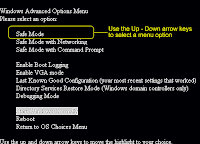
System restore works like undo command in Microsoft word. You can use system restore or removed anything change anywhere. System restore does not affect personal files or folder of your computer . So you can not change this files. If you want to get this you have need to follow these rules. At first click on the Start button, Then click Shut Down, When you get shut down dialogue box. Then click on the Restart and click on the OK Button. Before windows restart click on the F8 Button, You can press F8 when boot menu appears. Then highlight the appropriate safe mode button and press Enter. If your computer will fall on danger or affected with virus then it can safe your computer. So you have need to active this safe mode.

Windows XP backup Data

Image
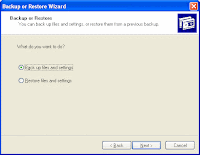
Computer backup is one kinds of important program for every computer . It will protect our files and folder of our computer if our computer fail. You can use the backup to copy the data. If you have windows XP professional we can backup utility is installed by default but windows XP home is not available for this. If you want to active this You have need to follow this step. At first click on the Start button, Then go to the All program. After go to the All program click Accessories Then go to the System tools after go to system tools click on the Backup. Then setting the backup files on the first page In the second page you can still use to backup files by clicking the tool menu and then click the backup wizard.  Then click Next. In the window that asks What do you want to do? Click the circle Next to backup files and setting Then click the Next. After these you can choice your backup the default choice your drive. You can backup files simply way Just copy and past...