in amazing computer, computer, Email, problem of email, traffic
Common Email Mistakes pointed out by Experts
Friday, July 27, 2012 in computer, computer for dummy, hard disk, Hard drive, Partition your hard disk, windows 7
Partition The Hard Drive Of Your Computer.
Wednesday, July 18, 2012 in clock, log, Notepad, program
Create a program with Notepad
Open your Notepad > then write > .LOG > then save that file as CLOCK > after create that you can see your time and date after open that files.
Friday, June 29, 2012 in 2D, 3D, computer blogspot, computer for dummy., image, rambus, video card
Video card
Monday, June 25, 2012 in bass sound, High quality, Just listen, Microlab, Powerful sound, RMS, sound box, Watts, X series.
Best sound box
Designed for small home system series the X series consist of a powerful sub woofer and small satellites This sub woofer system is ideal for home movies and music entertainment. Rich sound and powerful bass makes it the ideal choice and excellent all range performer Built with several technologies such as fine con, fine box and e Airbass. for perfect sound production. Its output power 68 watt RMS. Power distributions 14 watt x 2 + 400 watt. Frequency response 30 Hz - 20 kHz. Separation 48dB. Input sensitivity 310mV. If you want to get this High quality box, You have need to choose a Micro-lab Sound Box (Just Listen). Some models of X series are X 15, X 16, X 16.2.1.Sunday, June 24, 2012 in computer, control button, dummy. hardware, software, Start menu, system
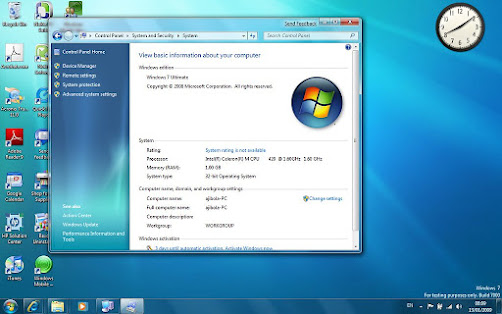
View your computer information
Open system by clicking the Start button > Control panel > System and maintenance > System.
Wednesday, June 20, 2012 in computer, Computer files, dummy, hard disk, Hard drive, hardware, make a hidden files, software
Create a dummy files
1. Test hard drives - Detected bad sector on your hard drive by filling up free space with a dummy files.
2. Securely delete files - A deleted files can be can be recovered but by overwriting the free space with a dummy files will make it unrecoverable.
3. Secure flash drive - Make your flash drive read only by filling up empty spaces and prevent virus infections.
4. Test network speeds - While there are free utilities available to test network speeds, You can do so with a dummy files too.
5. Dummy files can also help you escape a deadline you have got to prepare a report or finish your by putting the blame on your faulty computer.
Saturday, June 16, 2012 in computer, computer for dummy, Graphics card, Hard drive, hardware, Motherboard, Multi plug, plug, software
Schematic
Thursday, June 7, 2012 in basic knowledge, computer for dummy, F5, Hard drive, hardware, Hidden icon, make a hidden files, New Folder, on screen key board, properties, software
How to make a hidden files?
It is too easy for everyone. You can create it easily. Just follow this rules,
1. At first create a new folder
2. Then go to the properties
3. Click on the Change icon button
4. Select the hidden icon
5. Then press OK and then apply and OK again.
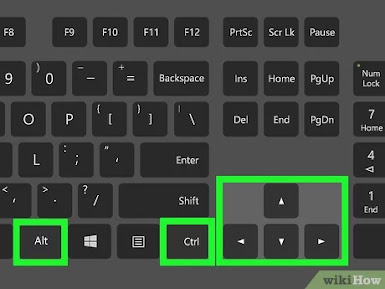
6. After hidden your files then you have need to rename it and then not save the files name just Press alt+0160
7. After doing that you can make it easily.
N.B: Where you will save that file in there if you can not find that file then press F5. You will find that easily.
Wednesday, May 30, 2012 in computer for dummy, hard disk, Hard drive, hardware, management, Resolve risk, Resolves Risk, Review, software, Win-Win spiral model
Win-Win Spiral Model
• Identify next-level stakeholders.
• Identify stakeholders’ win conditions.
• Reconcile win conditions.
• Establish next-level objectives, constraints, and alternatives.
• Evaluate product and process alternatives.
• Resolve risks.
• Define the next-level of product and process, including partitions.
• Validate product and process definitions.
• Review and commit.
The advantages from a win-win spiral model is the collaborative involvement of stakeholders that results in less rework and maintenance, early exploration of alternative architecture plans, faster development, and greater stakeholder satisfaction upfront.
in computer for dummy, hardware, software
Characteristics of software
Software Crisis.
During the late 1960s and 1970s, there was an outcry over an impending software crisis. The symptoms of such a crisis surfaced then and are present even today. The symptoms are the following:
1. Software cost has shown a rising trend, outstripping the hardware cost. Boehm (1976, 1981) indicated that since the fifties, the percentage of total cost of computation attributable to hardware has dramatically reduced and that attributable to software has correspondingly increased. Whereas software cost was only a little over 20% in the 1950’s, it was nearly 60% in the 1970’s, and about 80% in the 1980’s. Today, the computer system that we buy as ‘hardware’ has generally cost the vendor about three times as much for the software as it has for the hardware (Pressman 1992).2. Software maintenance cost has been rising and has surpassed the development cost. Boehm (1981) has shown that the bulk of the software cost is due to its maintenance rather than its development.
3. Software is almost always delivered late and exceeds the budgeted cost, indicating time and
cost overruns.
4. It lacks transparency and is difficult to maintain.
5. Software quality is often less than adequate.
6. It often does not satisfy the customers.
7. Productivity of software people has not kept pace with the demand of their services.
8. Progress on software development is difficult to measure.
9. Very little real-world data is available on the software development process. Therefore, it has not been possible to set realistic standards.
10. How the persons work during the software development has not been properly understood. One of the earliest works that explained to a great extent the causes of software crisis is by Brooks (1972). We shall get in the next section a glimpse of the work of Brooks.
in DVD, program, software, VCR
What is Software?
Tuesday, May 29, 2012 in ASUS, Audio Track, Sound card
How to choose the best Sound Card?
This is the computer part that is in charge of processing audio data and output to the speakers. A good sound card is necessary for a computer to play quality music. If you are a heavy multimedia user or gamer, this is one of the computer parts where you need to invest in. Sound cards can be a great purchase for sound enthusiasts and hardcore gamers. They help eliminate interference and similar problems that degrade sound quality. They can also help create a more realistic 3D audio environment.The potential sound output is also much greater, with a wider and richer frequency range. Sound cards such as the ASUS Xonar Essence STX, ASUS Xonar Essence ST and Creative Sound Baslter X-Fiwill truly deliver when it comes to overall sound quality. If you are wondering how to get the best possible sound out of your computer , or if you want to know what the advantages of sound cards over onboard sound are, check out our learning center articles on sound cards. In this review site, you'll find side-by-side comparisons and detailed reviews of the best PCI and PCIe audio cards.
in Case, computer, CPU, CRT, LCD, monitor, Technology
How to change the CPU case, Monitor and Controls?
in Gaming PC, Hard drive, Ram
How to choose the best Hard drive?
in CPU, Graphics card